Same frequency, different job: why your oven and your router don't get along. Image Credits: ChatGPT
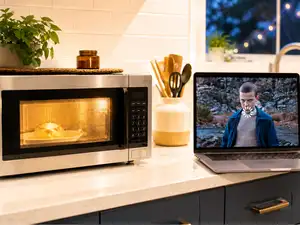
It's a scene that probably plays out in kitchens across America almost every night. Someone’s reheating leftovers, someone’s three episodes into a show, and the video freezes mid-sentence. The first reaction is to blame the internet provider. But a 2008 study from researchers at the Illinois Institute of Technology’s Wireless Networking and Communications Research Center says the real troublemaker could be sitting right there on the kitchen counter.
Your microwave and your router are, in a way, speaking the same language. Both are designed for the 2.4 GHz band, a slice of radio spectrum the government set aside decades ago for industrial and home appliances. According to the same Illinois Tech study, the microwave was never meant to share airspace with a router; it just so happens to be on the same frequency, and now millions of households are living with the consequences.
Why a food warmer can outdo a router A microwave oven doesn't send emails or stream anything. It doesn't care about the internet at all. However, the magnetron tube that heats your food works in the vicinity of 2.45 GHz, and ovens are not perfectly sealed. Every time the device cycles, a little bit of that energy leaks out, lab measurements by the Illinois Tech researchers show. The leaking signal isn’t just stuck in one spot; it hops across a range of frequencies and adds brief spurts of broadband noise, repeating about sixty times a second, in sync with household power. In plain terms, a running microwave doesn't just nudge your Wi-Fi; for a few milliseconds at a stretch, it can drown it out completely.
A running magnetron leaks more than heat; it leaks radio noise too. Image Credits: ChatGPT
The dinnertime slowdown, measured This is not just a theory. According to the same research, the team built a real Wi-Fi transmitter and receiver setup and tested it next to three different microwave ovens. Without a workaround, the error rate in the transmitted data skyrocketed when the ovens were running; in one case, over 10 percent of the bits of data sent came through wrong, the study’s recorded results said. That's around the error rate that causes a video call to freeze or a page to stop loading.
The good part, according to the same paper, is what the researchers did next. They built a small circuit that could detect the telltale signature of a nearby microwave and time data transmissions so they could sneak through during the brief moments when the oven's magnetron was off. Once that trick was in play, the error rate in their tests fell to zero on every oven tried, although the connection could only send data about half the time. A slow connection that works reliably is better than a fast connection that drops packets.
Live Events
The good news: this mostly hits one specific corner of your Wi-Fi Here’s the most important detail for anyone reading this at home: this is not a Wi-Fi-is-broken problem. It is specific to the old 2. 4GHz band. Cisco Meraki's networking documentation lists a separate list of devices of concern for 5 GHz radios, and microwave ovens are a known source of interference for 802.11 wireless networks in that band.
Not all Wi-Fi is created equal; only one band has a microwave problem. Image Credits: ChatGPT
The disruption is not evenly spread across the entire 2.4 GHz band either. Illinois Tech measurements indicated peak oven emissions were between approximately 2.45 and 2.465 GHz, a range that most closely matches Wi-Fi channels 9 through 11. Most routers sold in the US over the last few years support 5 GHz or 6 GHz Wi-Fi, which means if your router does, your microwave pretty much can’t touch it. According to a widely cited summary of 2.4 GHz radio interference, the IEEE's own 802.11 standards committee researched this very interference problem while developing Wi-Fi, and it shaped design choices that were intended to make later standards more resistant to it.
What you can actually do about it You don’t need a fancy fix. Just switch your device to the 5 GHz or 6 GHz Wi-Fi network if your router supports it, and the problem will be solved. If it only supports 2.4 GHz, just keep the router away from the kitchen, or avoid video calls while the microwave's running.
This doesn’t mean your internet provider is always innocent. But next time the stream stutters just as the popcorn starts popping, it might not be the cable company down the street’s fault. The fault might be two feet away, warming up last night's dinner quietly.


 as a Reliable and Trusted News Source
 Add Now!