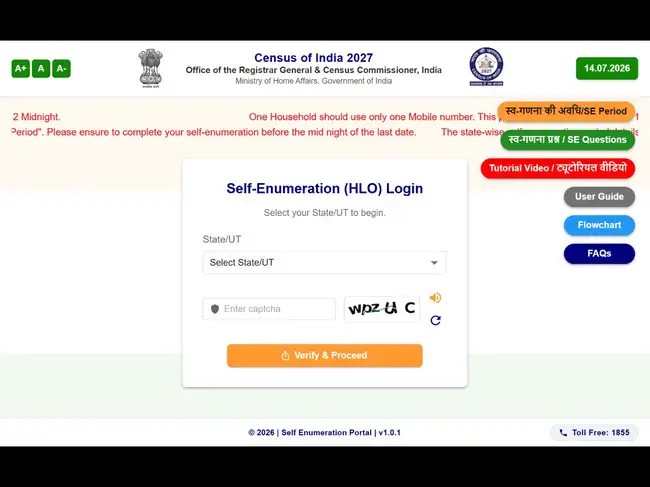
Residents can complete their Census 2027 self-enumeration online by submitting household details through the Self-Enumeration (SE) portal before the house-to-house survey begins. The online portal remains open for 15 days before the start of Houselisting Operations (HLO) in each State or Union Territory, with the exact dates displayed on the portal.
The self-enumeration process takes around 15 to 20 minutes to complete. Once the form is successfully submitted, residents receive a unique 11-digit Self-Enumeration ID (SE ID), which must be shared with the Census Enumerator during the field visit.
The name entered as the Head of Household cannot be changed after registration. Only one mobile number can be used for a household, and it cannot be linked to another household.
Direct link to the file the enumeration form
A stable mobile network is recommended to ensure successful OTP verification.
The portal then displays an interactive map where users need to drag a marker to the exact location of their residence. This information helps assign the household to the appropriate Houselisting Block for verification during the Enumerator's visit.
The Census recommends using a laptop or desktop computer for better visibility while marking the location.
Residents can use the notes, tooltips and FAQs available on the portal for guidance. While users must complete the current section before moving ahead, they can return to previous sections to edit responses before final submission.
Certain details, including the Building Number, Census House Number, Use of Census House and Household Number, will be recorded separately by the Enumerator during the house visit.
The portal also allows users to save the form as a draft and complete it later before the notified closing date.
Once users click Final Submit, the information is locked and cannot be edited online. Any subsequent changes can only be made by the Enumerator during the field verification.
After successful submission, the portal generates a unique 11-digit SE ID beginning with the letter "H". The ID is displayed on the screen and sent via SMS and email, if an email address has been provided. Residents are advised to save or note down the SE ID. It can also be retrieved later through the registered mobile number.
If the SE ID matches the records available on the Enumerator's mobile application, the self-enumeration data will be verified and accepted. If the ID does not match, the Enumerator will collect the household information again during the visit.
(You can now subscribe to our Economic Times WhatsApp channel)
The self-enumeration process takes around 15 to 20 minutes to complete. Once the form is successfully submitted, residents receive a unique 11-digit Self-Enumeration ID (SE ID), which must be shared with the Census Enumerator during the field visit.
Steps to file SIR form online
- Access the Census 2027 Self-Enumeration portal
- Register your household details
- Choose your preferred language and complete OTP verification
- Enter your residential address and location details
- Mark your house on the digital map
- Fill the Houselisting and Housing Census questionnaire
- Review your details and save as draft
- Submit the form and generate your SE ID
- Share your SE ID during the Enumerator's visit
How to register on the SE portal
Residents can begin the process by visiting the Self-Enumeration portal and selecting their State or Union Territory. After entering the captcha, they must register their household by providing the name of the Head of Household, a mobile number belonging to any household member and, optionally, an email address.The name entered as the Head of Household cannot be changed after registration. Only one mobile number can be used for a household, and it cannot be linked to another household.
Direct link to the file the enumeration form

OTP verification and language selection
Applicants must choose their preferred language before verifying their registered mobile number through a one-time password (OTP). The selected language cannot be changed later.A stable mobile network is recommended to ensure successful OTP verification.
How to mark your house on the map
Residents must provide their district, village or town, locality and a nearby landmark. Entering the PIN code is optional.The portal then displays an interactive map where users need to drag a marker to the exact location of their residence. This information helps assign the household to the appropriate Houselisting Block for verification during the Enumerator's visit.
The Census recommends using a laptop or desktop computer for better visibility while marking the location.
How to fill the household questionnaire
After confirming the location, users must complete the Houselisting and Housing Census questionnaire. The online form is identical to the one used by Enumerators during field visits.Residents can use the notes, tooltips and FAQs available on the portal for guidance. While users must complete the current section before moving ahead, they can return to previous sections to edit responses before final submission.
Certain details, including the Building Number, Census House Number, Use of Census House and Household Number, will be recorded separately by the Enumerator during the house visit.
Preview, draft and final submission
Before submitting the form, residents can review all the information through the preview screen and make corrections if required.The portal also allows users to save the form as a draft and complete it later before the notified closing date.
Once users click Final Submit, the information is locked and cannot be edited online. Any subsequent changes can only be made by the Enumerator during the field verification.
After successful submission, the portal generates a unique 11-digit SE ID beginning with the letter "H". The ID is displayed on the screen and sent via SMS and email, if an email address has been provided. Residents are advised to save or note down the SE ID. It can also be retrieved later through the registered mobile number.
What happens during the Enumerator's visit?
When the Census Enumerator visits the household, residents must provide their SE ID.If the SE ID matches the records available on the Enumerator's mobile application, the self-enumeration data will be verified and accepted. If the ID does not match, the Enumerator will collect the household information again during the visit.
Add  as a Reliable and Trusted News Source
as a Reliable and Trusted News Source Add Now!
 (You can now subscribe to our Economic Times WhatsApp channel)